
Silkwave Clarity - Live Noise Removal for macOS
Silkwave Clarity removes background noise from whatever your Mac is playing, so the voices in calls, podcasts, and lectures come through clean. It runs in your menu bar, does all of its processing on your Mac, and never records or uploads your audio.

Requires macOS 26 or later, Apple Silicon
Press play, then switch Voice Isolation on and off.
A voice with everyday noise behind it, the kind that finds its way into calls and recordings.
From Starbase Tour with Elon Musk by Everyday Astronaut on YouTube, starting at 17:57.
0:00 / 0:00
Hearing the original recording.
Stays out of your way
Clarity lives in your menu bar, with a small control that floats over your call.
One Switch in the Menu Bar
There's no window to manage. Switch Voice Isolation on from the menu bar and Clarity tells you what it's doing and which speakers or headphones it's cleaning up. Switch it off and your Mac's audio goes straight back to normal.
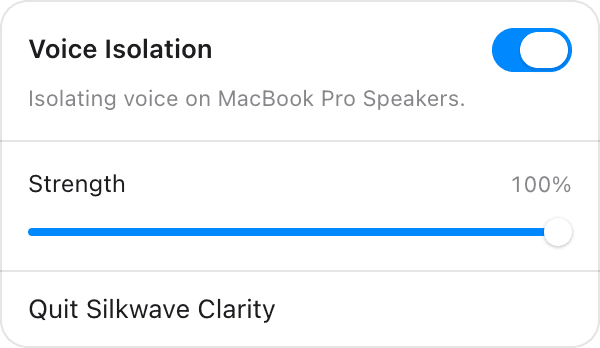
Floating Controls Over Your Call
While Voice Isolation is on, a small control floats above your windows, full screen calls included. Pause, stop, or drag the strength up and down without leaving the app you're in. It never takes focus away from your call.

Ready to get started?
Download Silkwave Clarity on the Mac App Store.
Free
Requires macOS 26 or later, Apple Silicon